After you sign in you'll see the Dashboard. It's your starting point: it tells you how many pages are live, what's waiting to be published, and anything that needs attention.
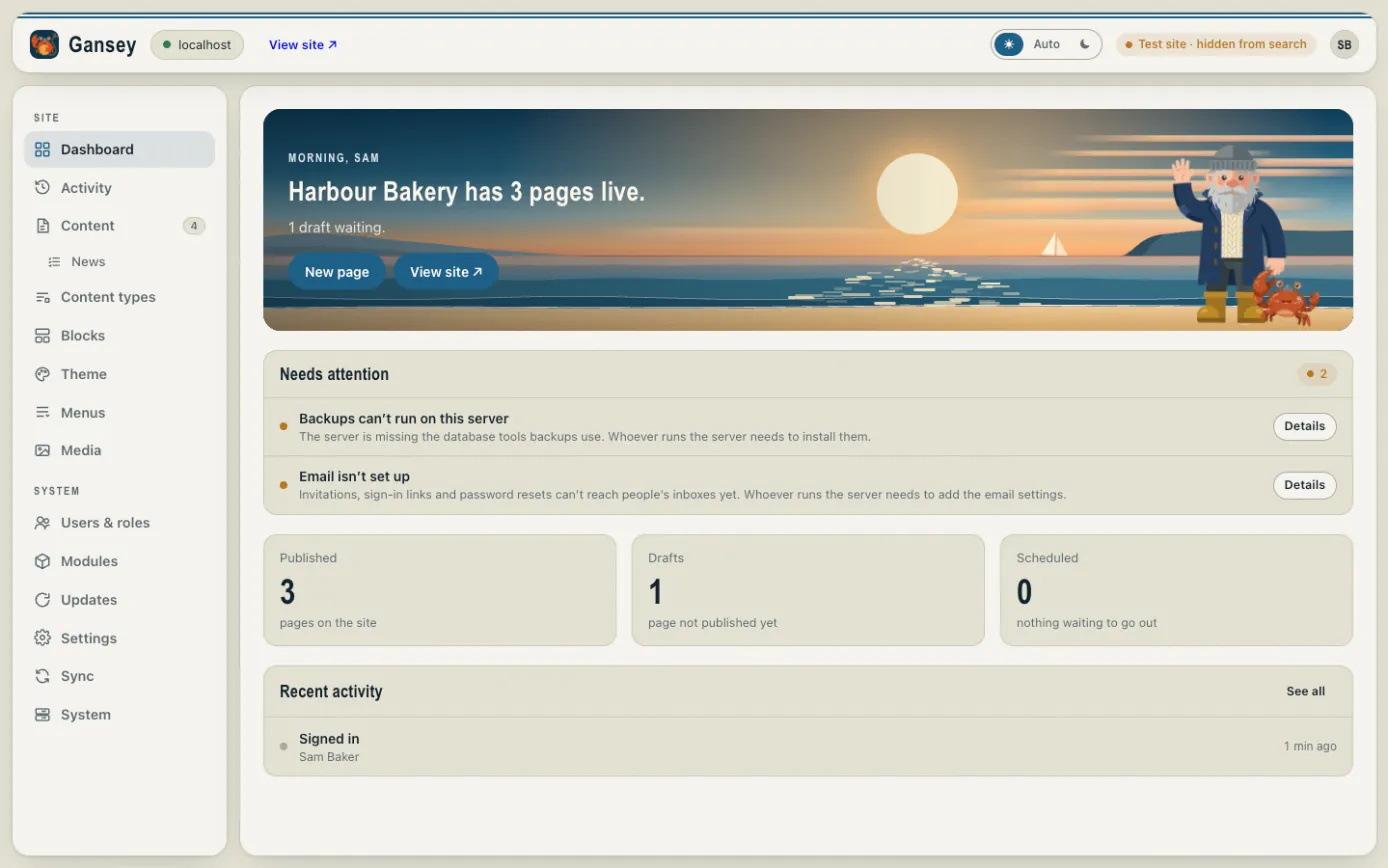
The menu on the left
The menu down the left takes you to each part of the admin. The ones you'll use most are near the top:
- Dashboard: the summary you see when you sign in.
- Activity: a list of everything that has changed, and who changed it.
- Content: your pages, plus any news or other items your site has.
- Theme: the colours, fonts, header and footer used on every page.
- Menus: the links in your site's header and footer.
- Media: your pictures and files.
Further down, under System, are screens for looking after the site: people, modules (extra features), updates and settings. You might not see all of them; it depends on what your account is allowed to do.
The bar along the top
- View site opens your public website in a new tab, so you can see what visitors see.
- The sun and moon switch the admin between light and dark. Auto follows your computer's setting.
- Your initials open Your account.
Needs attention
If something on the Dashboard is listed under Needs attention, it explains what's wrong and who usually fixes it. Many of these (like email or backups not being set up) are for your web developer or whoever hosts the site.